
The Hotel Wi-Fi Page That Was Not the Hotel
You check into a hotel, open the laptop, and a browser tab appears on its own. Guest Wi-Fi. Room number, surname, tick the box, connect. You have done it a hundred times and never once looked at the address bar, because the whole point of that page is that it turns up uninvited on a network you do not control. That habit has now been turned into an attack route.
On 31 July 2026, Microsoft Threat Intelligence published research into a campaign it calls CaptiveCrunch. Attackers have taken control of the captive portal equipment behind guest Wi-Fi at hotels and conference venues in several countries, then used that position to serve fake software updates and fake Microsoft sign-in pages. The target is not the hotel. It is the Microsoft 365 accounts of the business travellers passing through it.
What is a captive portal, and why does it matter here?
A captive portal is the gateway between a guest device and the internet. When your laptop joins the network it quietly sends a small connectivity check to see whether it really has a working connection. The portal intercepts that check and answers with the sign-in page instead.
That is a lot of power to hand to a box in a hotel basement. Whoever controls it decides what your browser sees first. Microsoft observed the attackers manipulating DNS and HTTP traffic on networks served by this equipment.
Who is behind it, and how long has it been running?
Microsoft attributes the activity to Storm-2945, which it assesses to be an operational sub-cluster of Midnight Blizzard. Midnight Blizzard has been attributed by the US and UK governments to the Foreign Intelligence Service of the Russian Federation, the SVR.
The portal manipulation has run since at least early May 2026. Microsoft says it could not determine how the equipment was first compromised, but the pattern pointed to shared infrastructure rather than isolated devices. ReliaQuest, which disclosed the DNS tampering earlier, found the same activity at conference centres and other shared venues, and assesses that the goal is access to the accounts of corporate travellers.
Three doors, one destination
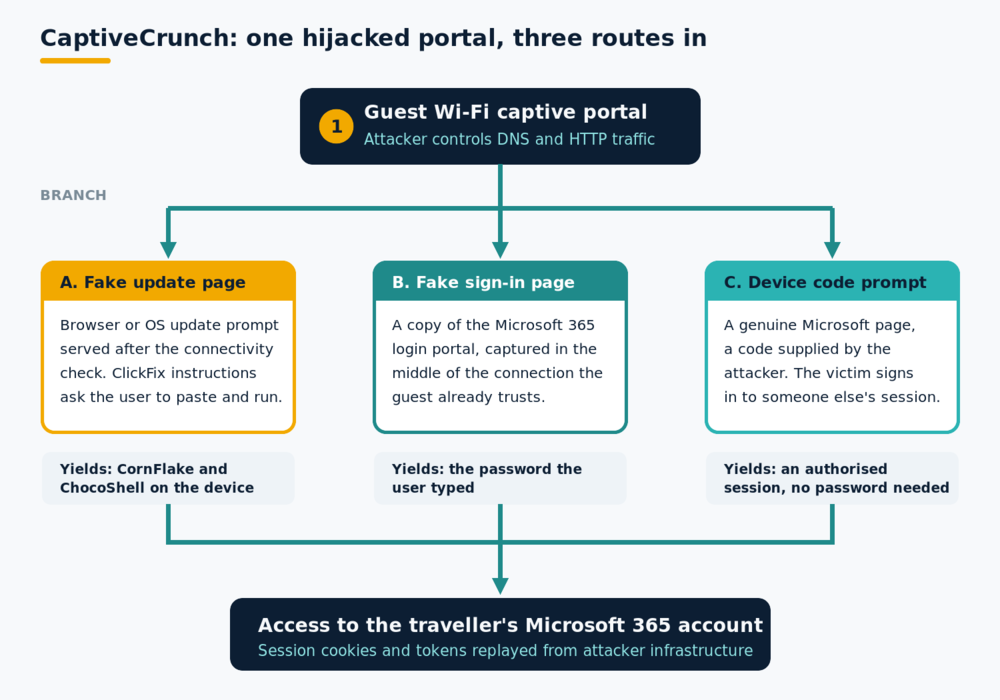
Once an attacker sits in the middle, three routes open up. The first is a fake browser or operating system update, served in reply to that automatic connectivity check. These pages use ClickFix techniques: a verification step appears to fail, and the page offers helpful manual instructions that involve copying a command and running it yourself.
The second is a straightforward fake Microsoft 365 sign-in page that captures whatever is typed into it.
The third appeared from 16 July. Some landing pages now push visitors into a device code flow, asking them to type a short code into a genuine Microsoft sign-in page. The page is real and the certificate is valid, so nothing looks wrong. The catch is that the code belongs to the attacker's session, so the person signing in authorises somebody else's device.
Why does a fake update prompt work so well here?
Because the context has already done the persuading. On hotel Wi-Fi, an odd page appearing without warning is normal, and so is being asked to do something before you get online. A browser complaining that something needs updating on a slow, unfamiliar connection is entirely believable.
The malware leans into that. Microsoft found that the main implant, a Go-based remote access tool it names CornFlake, shows a convincing fake progress window while it installs itself in the background. Operators pick which window to display when they build the payload: a Windows Update screen, a security scan, a disk optimisation tool, a browser update prompt, or a document viewer installer.
What are the attackers collecting?
Microsoft's analysis of CornFlake lists keylogging, clipboard monitoring, screenshots, microphone and webcam capture, browser credential and cookie theft, file exfiltration and remote command execution.
Alongside it runs a PowerShell tool Microsoft calls ChocoShell, which executes in memory and goes after the fast wins: browser session cookies, saved passwords, Wi-Fi credentials, and Microsoft 365 and Azure AD tokens from the local token cache. Those tokens are the prize. A stolen access or refresh token lets somebody resume an already authenticated session without meeting a password prompt or an MFA challenge, the same weakness that makes adversary-in-the-middle phishing so effective.
The bit that changes how you think about it
It is tempting to file this under clever malware. The other end of the chain is more interesting. Nothing here needed a convincing email. There was no spoofed sender to inspect, no lookalike domain to spot, no attachment to hover over. The instincts we spend years building in people, check the address, check the sender, be wary of unexpected requests, were built for a world where the suspicious thing arrives in the inbox. Here it arrives in the room.
Think of someone in a hi-vis jacket walking across a building site. Nobody stops them, because the jacket matches the setting. The captive portal is that jacket. Guest Wi-Fi has spent fifteen years training all of us to accept a strange page from an unknown operator as the price of getting online, and the attackers did not have to defeat that training. They inherited it. That is a gap in what people were taught to look for, which is far more fixable than blaming them for falling into it.
What travelling staff can do
- Treat hotel, conference and airport Wi-Fi as untrusted. Use a phone hotspot or eSIM data where practical.
- Never install anything offered through a captive portal: no browser update, no certificate, no troubleshooting tool.
- Check for updates in the operating system's settings, not from a prompt that appeared in a browser.
- Treat any page asking you to copy a command and run it as hostile.
- Do not use work credentials to register for guest Wi-Fi.
What organisations can do
- Move towards phishing-resistant authentication. Passkeys remove the value of a captured password, though not of a token already stolen from a device.
- Block the device code authentication flow in Conditional Access unless a business case requires it.
- Use sign-in risk policies and continuous access evaluation so an unusual session can be challenged or revoked.
- Give travelling staff a managed alternative before they need it: a company hotspot, an eSIM allowance, or a travel router.
- Brief people on paste-and-run prompts and captive portal update pages. Most awareness programmes have never covered this, because no email is involved.
Key takeaways
- Microsoft published research on 31 July 2026 into CaptiveCrunch, a campaign that hijacks guest Wi-Fi captive portals at hotels and conference venues.
- It attributes the activity to Storm-2945, assessed as a sub-cluster of Midnight Blizzard, which the US and UK governments have attributed to Russia's SVR.
- Guests are steered towards fake software updates, fake Microsoft 365 sign-in pages, or device code prompts that authorise the attacker's session.
- CornFlake and ChocoShell are built to steal credentials, session cookies and Microsoft 365 tokens and to keep watch on the device.
Frequently asked questions
Is a VPN enough to protect me on hotel Wi-Fi?
A VPN protects traffic once it is running, but not the moment before that. The captive portal has to be accepted first, and it is that page, and anything it offers you to download, that carries the risk here. A VPN also does nothing once you have installed something the portal handed you.
Does multi-factor authentication stop this?
It helps and it is worth having, but it is not a complete answer. Device code phishing works by getting the user to approve a genuine authentication request, so MFA is satisfied by the victim on the attacker's behalf. Stolen session tokens skip the sign-in entirely. Passkeys and hardware keys are stronger, and blocking the device code flow closes one route on its own.
How would someone know their laptop had been affected?
Often they would not, which is why reporting matters more than diagnosing. Anyone who ran a command from a web page, installed an update served by a portal, or entered a code they were given should tell IT straight away from a different connection, so sessions can be revoked and the device checked. Nobody should be in trouble for reporting it.
Phishing Tackle offers the tools businesses need to strengthen their human risk strategies, with multi-platform testing, real-time behavioural insights, and actionable data to keep your organisation ahead of modern cyber threats.
Contact us today to learn how Phishing Tackle can help safeguard your organisation from the growing array of cyber risks.
