
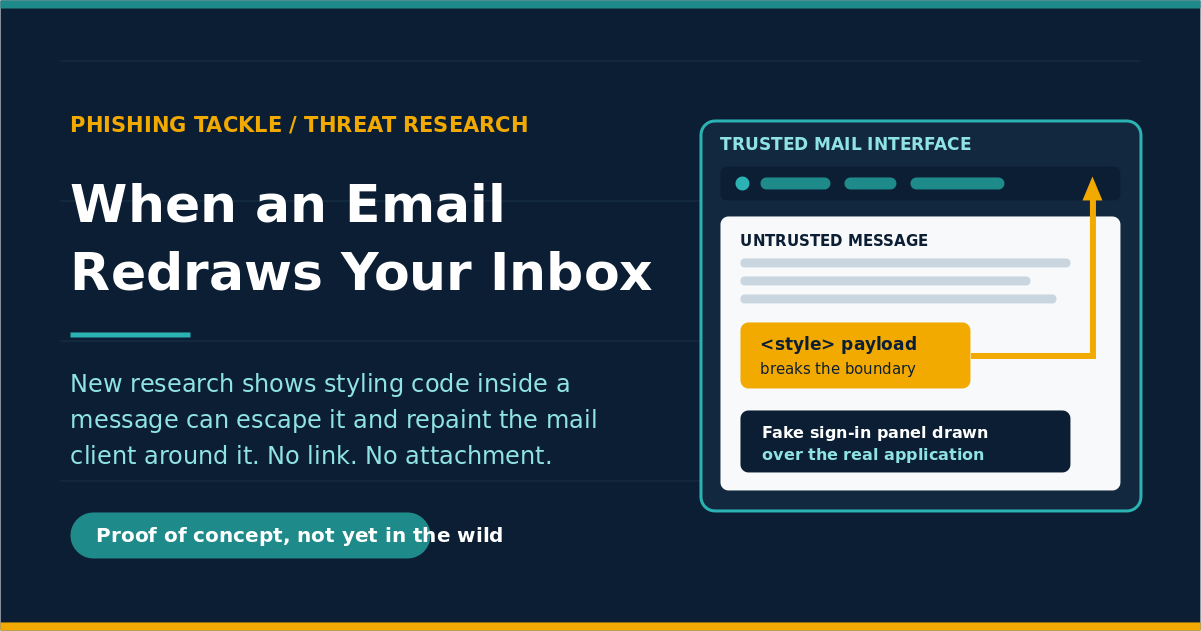
When an Email Can Redraw Your Inbox
Check the address bar. Look at the sender. Hover over the link before you click it. Almost every piece of phishing advice ever given rests on one assumption that nobody says out loud, which is that the window around the message is telling you the truth. This month a researcher went after that assumption directly, using nothing more exotic than the styling code inside an ordinary email.
Here is the short version. Gareth Heyes, a researcher at PortSwigger, found ways for the CSS inside an HTML email to break out of the message it arrived in and take control of the webmail interface around it. In one demonstration against Outlook in Firefox, an email fills the screen with a convincing Microsoft sign-in page and captures the password the recipient types, with no JavaScript involved at all. This is proof-of-concept research rather than an attack seen in the wild, but it quietly changes what "look before you click" can promise.
What is CSS doing in my email in the first place?
Every newsletter, every supplier invoice, every automated alert arrives as HTML. The colours, the fonts, the buttons that look like buttons: all of that is CSS, the styling language of the web. Your mail client has to take styling written by a total stranger and draw it inside its own interface, next to your folder list and your reply button.
Providers solve that with sanitisers, which read the incoming code, discard anything dangerous and pass the rest through. As Heyes puts it in the published paper, "it's quite common for webmail clients to render untrusted CSS in a trusted UI". The weakness is not a lazy sanitiser. It is the gap between what the sanitiser believes it approved and what the browser eventually draws.
How does an email escape its own box?
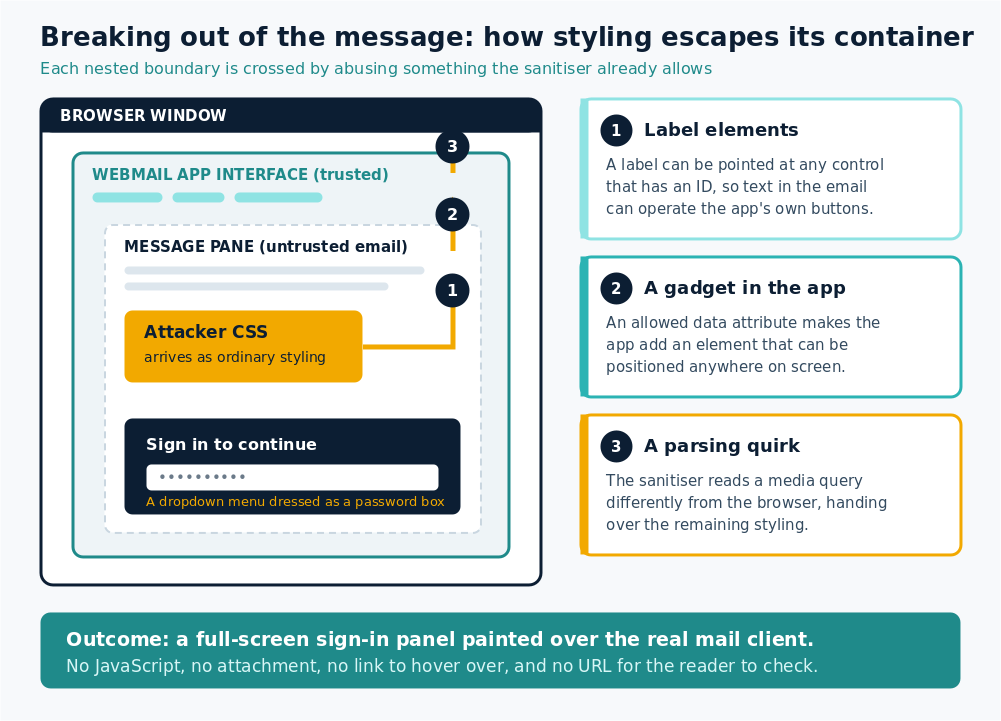
Against Outlook it happened in stages. The first used the humble HTML label element, which can be pointed at any form control that has an ID so that clicking the label operates that control. Outlook let labels through, so an email could contain text that quietly worked Outlook's own toolbar. Microsoft had not fixed that behaviour when the research was published.
The second stage used what researchers call a gadget. Outlook permits certain custom data attributes, and one of the libraries behind the interface responds to them by adding an element that can be positioned anywhere on screen. The sanitiser approved the ingredient and the application supplied the danger. A parsing quirk in how Outlook handled media queries then gave the researcher control of the remaining styling, and the message was no longer confined to the message pane.
How can a stylesheet steal a password?
This is the part that sounds impossible. CSS cannot read what you type, and the well-known "CSS keylogger" trick does not work on a real password box, because typing updates the browser's internal value rather than the HTML attribute the rule is watching.
So the research did not use a password box. It used a dropdown menu styled to look exactly like one, characters masked into dots. Each time a keypress selects an option, a rule fires and requests an image from the attacker's server, and the address requested reveals the letter. One obstacle remained: browsers pause for just under a second before allowing a second selection, which made capture too slow to be believable. Firefox resets that timer when the element moves off screen, so an animation flicks it away and back in a fraction of a millisecond. The result is real-time capture of a typed password inside a full-screen fake sign-in panel.
The turn: the frame was the payload
Look at what a person would have to do wrong for this to work. Nothing. They open an email in the mail client their employer gave them. There is no attachment to open, no macro to enable, no link to hover over, no lookalike domain to squint at. The sign-in panel is not on a suspicious website, because it is not on a website at all. It is painted on top of the application they have used every day for years.
Mainstream phishing advice teaches people to interrogate the content and trust the container. This research treats the container as the target. It is closer in spirit to a browser-in-the-browser attack, where a fake window is painted inside a real page, except here the paint goes onto the application itself.
What else did the research break?
Outlook was not the only target. In Yahoo Mail and AOL Mail, a race condition meant styling copied to the clipboard stayed briefly active after being pasted into a draft, long enough to leak a twelve-character sign-in token belonging to a third-party website and let an attacker sign in as the victim. In Gmail, a fallback inside an image function slipped past sanitisation and allowed an outbound request. Fastmail fixed two mutation bugs and paid a bounty for each, and a Proton Mail vector that exposed a reader's IP address had stopped working by the time it was retested.
One chain deserves its own mention. Working with colleague Pete Hendy, the researchers combined the Gmail bypass with an indirect prompt injection aimed at an AI assistant connected to a mailbox. A planted email persuaded the assistant to find an access token and place it inside a draft, where simply viewing that draft sent it onward. Assistants that read your mail on your behalf inherit both your trust and your access.
So what is proportionate here?
Be honest about what this is. These are public proof-of-concept techniques presented at Black Hat USA 2026, with no reported criminal use, and several of the specific bugs have been fixed. Nobody should be told their staff are now expected to spot a fake sign-in screen drawn by their own mail client. They cannot, and implying otherwise would be unfair.
What helps is mostly structural. Ask your email provider what isolation they apply to message HTML, whether they proxy image requests, and whether they block form controls and reactive selectors in styling. Reduce what a captured password is worth by moving high-value accounts to phishing-resistant sign-in such as passkeys or hardware keys. Keep browsers current, since several of these techniques rely on quirks specific to one browser.
Then equip people with the one judgement that still works. Nobody can audit a stylesheet, but anybody can notice that their mail client has suddenly asked them to sign in again, mid-message, for no reason. The right instinct is to close it, open the application fresh from a bookmark, and sign in there. The right follow-up is to report the odd message even when nothing bad appeared to happen, which only occurs where reporting is genuinely welcomed rather than treated as an admission of failure. In a case like this one, the person who says "that was weird" is the only sensor you have.
Key takeaways
- Researchers have shown that CSS inside an email can escape the message and control the webmail interface around it, including a working fake Outlook sign-in screen that captures a typed password.
- The techniques use no JavaScript, no attachment and no link, so "check the link and the sender" advice does not catch them.
- This is published proof-of-concept research from Black Hat USA 2026, not an observed criminal campaign. Some bugs were fixed, others had not been at publication.
- AI assistants connected to mailboxes widen the problem, because they act with the user's access and can be steered by text hidden in a message.
- The practical defences are structural: provider hardening, phishing-resistant sign-in, current browsers, and a culture where people report anything that feels wrong.
Frequently asked questions
Is my email account currently being attacked this way?
There is no public evidence of criminals using these techniques. The research was published as proof of concept, with demonstration code released so providers can test and fix their own products. Treat it as a warning about a class of weakness rather than an active incident.
Would multi-factor authentication have stopped it?
It depends on the type. A captured password alone is much less useful when a second factor is required, but codes and push approvals can still be requested by an attacker who already holds the password. Phishing-resistant methods such as passkeys and hardware security keys are bound to the real site and are the stronger answer.
Does this only affect webmail in a browser?
The techniques shown target webmail clients rendering HTML email in a browser, and several depend on specific browser behaviour. Desktop and mobile mail applications render HTML too, so the underlying problem of untrusted content sitting inside a trusted interface is broader than any one product.
What is the single most useful thing to tell staff?
If an application asks you to sign in again at an unexpected moment, do not type your password into that prompt. Close it, open the application yourself from a bookmark or a fresh tab, sign in there, and report what you saw.
Phishing Tackle offers the tools businesses need to strengthen their human risk strategies, with multi-platform testing, real-time behavioural insights, and actionable data to keep your organisation ahead of modern cyber threats.
Contact us today to learn how Phishing Tackle can help safeguard your organisation from the growing array of cyber risks.
