
Browser-in-the-Browser: The Fake Login Pop-Up You Cannot Trust by Sight
One of the most repeated pieces of phishing advice is to check the address bar. If the web address is wrong, do not sign in. It is sound guidance, and attackers have built a technique specifically to defeat it. Browser-in-the-browser phishing fakes the entire sign-in pop-up, address bar and all, so the very thing you were told to check becomes part of the trick. What looks like a genuine Google or Microsoft login window is not a window at all. It is a picture, drawn inside the web page.
It is a tidy piece of deception, and it undermines a habit that millions of people have been trained to rely on.
Straight to it: many sites let you sign in with Google, Microsoft or another provider, which opens a small login pop-up. Browser-in-the-browser recreates that pop-up inside a malicious web page, complete with a convincing but fake address bar. Because the URL you would check is only an image, inspecting it by eye no longer helps. The reliable tell is that a password manager or passkey will not fill the fake window.
How browser-in-the-browser phishing works
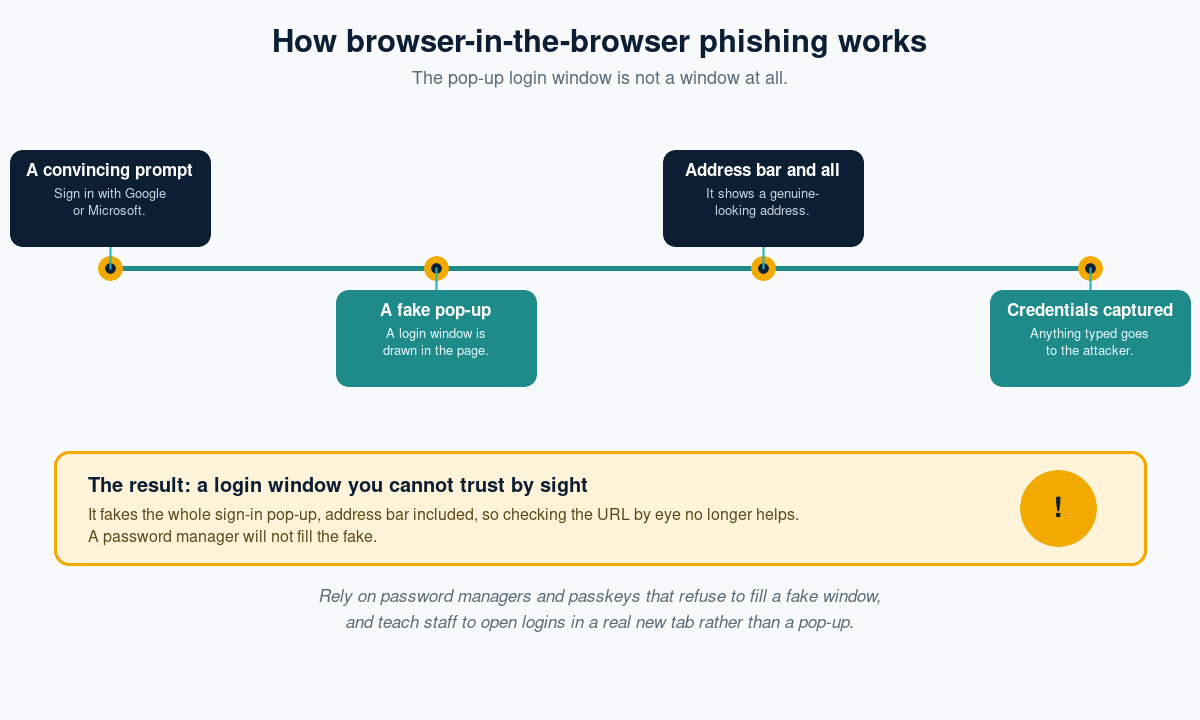
The attack builds on something entirely normal. Countless websites offer a convenient sign-in with Google, Microsoft, Apple or Facebook, which pops up a small provider login window over the page. Browser-in-the-browser mimics that experience precisely. When the victim clicks sign in, the malicious page draws a fake pop-up using ordinary web code: a title bar, a close button, and a realistic address bar showing the genuine provider domain. It looks exactly like the real thing. But it is part of the page, not a separate browser window, so the address it displays is purely decorative. Anything the victim types into it, username, password, even a one-time code, goes straight to the attacker.
Why the usual checks fail
The standard defences lean on the user inspecting the URL, and that is exactly what this defeats. The fake address bar can show a perfect, legitimate-looking web address, so checking it by eye offers false reassurance. The window can be dragged and styled to feel real. For a careful person doing everything they were taught, the visual cues all point to safe. This is why relying on human URL-checking alone is no longer enough.
The tells that still work
- The pop-up cannot leave the browser window. A real login window can be dragged outside the page; a fake one is trapped inside it.
- Your password manager does not offer to fill it. Managers match on the true page address, so they will not autofill a fake window, which is a strong signal.
- The sign-in appeared on an unexpected site, or after clicking a link you did not fully trust.
How to defend against it
Use password managers and passkeys
This is the most reliable technical defence. A password manager will not fill credentials into a fake window, and a passkey is bound to the real domain, so it simply will not work on the imitation. Both take the human eye out of the decision.
Prefer opening logins yourself
Teach staff to be wary of a login pop-up that appears unprompted, and to sign in by opening the provider in a real new tab instead. If autofill does not trigger, treat that as a warning rather than a nuisance.
Watch for the sites that host it
These pages often sit on look-alike domains or newly registered sites, so domain monitoring and web filtering help catch them and reduce the chance a convincing page ever loads.
Train and make reporting easy
Show people what a browser-in-the-browser pop-up looks like so they know the URL is no longer proof, run realistic simulations that reflect it, and give them a simple way to report a suspicious email or page.
The bottom line
Browser-in-the-browser phishing turns our best habit against us by faking the very address bar we were told to trust. When the URL can be a picture, checking it by eye is no longer enough, so the defence shifts to tools that cannot be fooled by appearances. Lean on password managers and passkeys that refuse to fill a fake window, open logins in a real tab rather than a pop-up, and teach people that a convincing address bar proves nothing on its own. What you cannot verify by sight, let your software verify for you.
Phishing Tackle offers the tools businesses need to strengthen their human risk strategies, with multi-platform testing, real-time behavioural insights, and actionable data to keep your organisation ahead of modern cyber threats.
Contact us today to learn how Phishing Tackle can help safeguard your organisation from the growing array of cyber risks.
