
When the Login Page Is Real
Most phishing training lands on one instruction above all others: look at the address bar. If the sign-in page is not the real one, do not type your password. That advice is sound and it still catches a great deal, but it does not cover the campaigns that Google Threat Intelligence Group (GTIG) documented on 20 August 2026. In those, the sign-in page was the real one.
The Google login screen was genuine. The WhatsApp linking code was genuine. The settings page one set of victims was walked through was Google's own. Nothing had to be counterfeited, because the attackers were borrowing features the platforms provide on purpose.
What the researchers found
GTIG's report on three distinct clusters, tracked as UNC6293, UNC7005 and UNC5976, describes what it calls Russia's authentication-focused cyber espionage operations. The techniques run from app passwords to OAuth consent to device linking, and they share a single goal: account compromise.
The named targets are academics, diplomats, defence-linked businesses and nonprofit staff, and GTIG notes the accounts are often personal ones rather than corporate domain-joined accounts. The tradecraft, though, is not exotic. It uses documented features of Google, Microsoft and WhatsApp exactly as designed, and techniques that need no custom tooling rarely stay confined to espionage.
The app password: a credential the victim creates
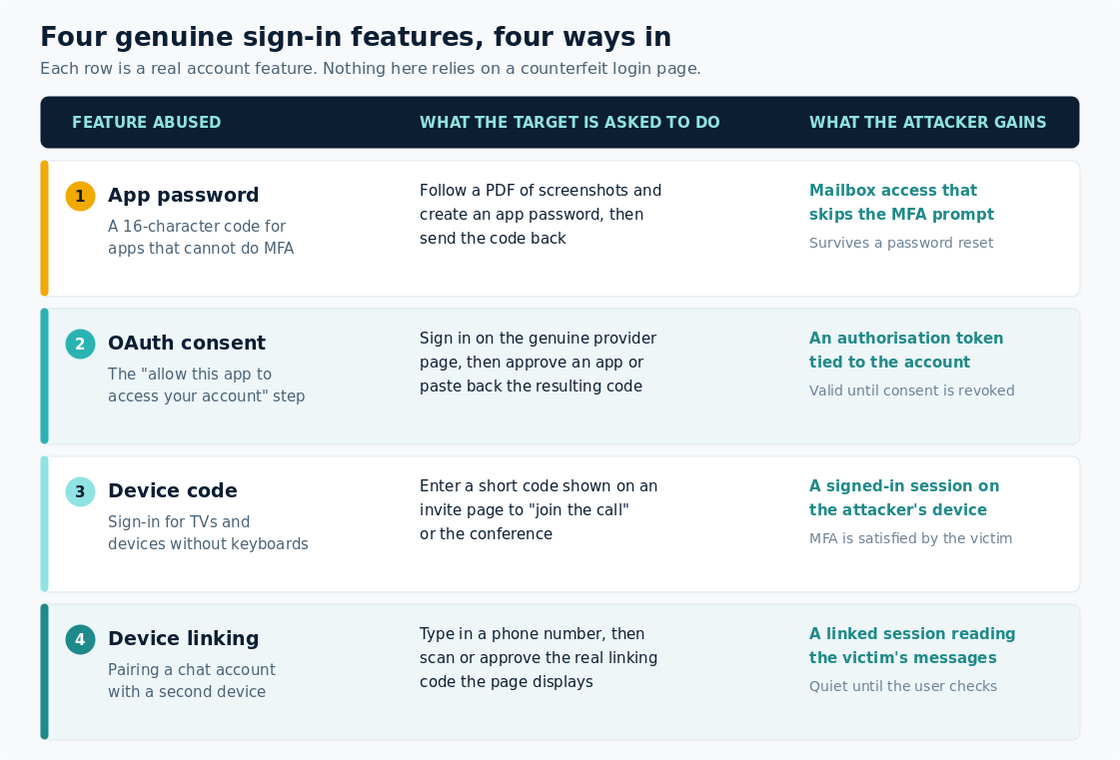
An app password is a 16-character code that lets older software sign in to an account when it cannot handle a modern login. That is the point of the feature, and it is also the problem. A session opened with an app password does not go through the two-factor prompt.
GTIG describes UNC6293 impersonating the US State Department and persuading targets to create an app password named ms.state.gov. The instructions arrived as a PDF containing screenshots of the exact settings the attacker wanted the target to use. A year on, the group is still impersonating State Department officials and still running the same play.
Consider what the victim experiences. They are on the real Google settings page, they type no password into anything belonging to the attacker, and they generate the new credential themselves while following a guide from someone who has corresponded with them politely for weeks. Every instinct that phishing training builds, about fake domains and rushed demands, stays quiet.
OAuth consent: signing in for real, then giving away the token
The second technique targets the approval step after a login, the screen asking whether an application may access your account.
From 31 July 2026, GTIG saw UNC7005 register domains spoofing the Finnish Operations Center, an organisation supporting Finnish defence and security companies. Targets who followed the link were redirected to a legitimate Google OAuth login page and prompted to sign in. Those who authenticated were sent on to an attacker-controlled cloud project, running in testing mode and unverified, which GTIG assesses was likely used to steal the authentication tokens granting access to the account. The same cluster was also seen sending legitimate Microsoft OAuth URLs straight to targets.
UNC6293 ran a simpler variant in June 2026. After the target completed a genuine login with an external provider, the attacker asked them to share the full URL they had landed on, or the verification code displayed to them. Passing that back handed over access.
Device codes and device linking: approving someone else's session
Device code sign-in exists for televisions, meeting room hardware and anything else without a comfortable keyboard: you see a short code on one screen and enter it on another. We have covered device code phishing before, and GTIG confirms UNC7005 is still running it against Microsoft and WhatsApp accounts, with lures built around invitations to calls with notable figures in the target's field and, more recently, diplomatic events.
The WhatsApp version illustrates the pattern most clearly. In May and June 2026, targets reached a page that asked for their phone number. The page used that number to create a real WhatsApp device-link request for a device the attacker controlled, then displayed the genuine QR code and linking code back to the target with instructions to complete the link. Anyone who followed them gave the attacker a linked session capable of reading their messages.
The page did not stop there. After a successful link it offered further steps, such as joining a voice call or opening an encrypted chat using credentials to be copied into a second login page. GTIG also documented JavaScript on these pages written to record the target's audio and video and upload it to attacker infrastructure.
Why this is hard to spot
Strip these campaigns down and the same properties keep appearing. There is no counterfeit login page at the moment of decision, so the address bar check passes. No secret is typed into an attacker's form. Multi-factor authentication is not bypassed by a clever exploit, it is satisfied by the genuine user, who approves in good faith. And what the attacker ends up holding, whether a consented application, an app password or a linked device, looks in the logs a great deal like something the user meant to do. GTIG makes this point directly: the creative abuse of legitimate features makes distinguishing malicious from legitimate account access much harder.
What to tell your people
The signal to recognise moves from "is this page fake" to "why is this being asked of me at all". That shift is teachable and narrow enough to remember.
- No legitimate party needs a code off your screen. Verification codes, linking codes and app passwords are never shared, in any direction, for any reason.
- Be wary of anyone guiding you through your own security settings. A helpful PDF showing which options to change is a warning sign in itself, however plausible the sender.
- Approving is a decision, not a formality. An app permission or a device link deserves the same pause as typing a password into an unfamiliar page.
- Check what already has access. Connected apps, app passwords and linked devices are all reviewable, and a foothold sits there quietly until somebody looks.
Tone matters as much as content here. People approved these requests because approving looked like cooperation, often after weeks of friendly correspondence. Blame teaches them to hide the next one. Give them a clear rule and an easy way to report anything that feels odd, and they become the control that catches what the filters cannot.
What to change in your tenant
- Restrict device code flow. Microsoft's guidance is to get as close as possible to a unilateral block using Conditional Access, allowing it only for documented cases such as legacy tooling.
- Limit who can consent to applications. Microsoft recommends allowing user consent only for apps from verified publishers and only for low-impact permissions, with an admin approval route for the rest.
- Retire app passwords. Google notes its Advanced Protection Program prevents accounts creating them, and Workspace administrators can remove the option by restricting two-step verification to security keys only. Existing ones can be deleted at any time.
- Alert on the artefacts. New consent grants, app passwords and linked devices are low-volume, high-signal events worth a rule.
- Bring personal accounts into the conversation. They sit outside your policy, but the people using them do not sit outside your organisation.
The bottom line
These groups are not defeating authentication, they are using it. Every step is a supported feature working correctly, which is why detection is awkward and why the decision keeps landing on a person. That makes the human layer worth the investment, alongside the tenant settings that remove the option entirely. Phishing-resistant sign-in helps, but only where the legacy paths around it have been closed.
If you teach one habit, make it this: an unexpected request to approve, link or generate anything is a request to stop and verify through a channel you chose yourself.
Phishing Tackle offers the tools businesses need to strengthen their human risk strategies, with multi-platform testing, real-time behavioural insights, and actionable data to keep your organisation ahead of modern cyber threats.
Contact us today to learn how Phishing Tackle can help safeguard your organisation from the growing array of cyber risks.
