
MFA Fatigue: When Approving a Prompt Hands Over Your Account
Multi-factor authentication is one of the best defences an organisation can deploy, but attackers have found a way to turn its convenience against it. MFA fatigue, also called push-bombing, does not break the second factor at all. It simply wears down the person behind it until they tap “approve” to make the noise stop. It is a reminder that a control is only as strong as the human interaction at its centre.
The short version: the attacker already has a valid password, then floods the victim’s phone with repeated MFA prompts. Confused or exhausted, the victim eventually approves one, and that single tap logs the attacker straight in. The factor worked exactly as designed; the human was the weak link. Number matching and a few sensible policies turn that blind tap back into a deliberate decision.
Why this attack works so often
Push-based MFA was designed to be effortless: a prompt appears, you tap yes. That very simplicity is the vulnerability. When prompts arrive relentlessly, late at night, during a meeting, one after another, the path of least resistance is to approve one just to stop the interruption. The attacker only needs a single yes.
The precondition is a working password, and those are cheap. Infostealer malware and credential-reuse mean vast numbers of valid username-and-password pairs circulate on criminal markets. With Verizon’s 2025 Data Breach Investigations Report attributing around 60% of breaches to the human element, an attack that hinges on one tired human decision is a natural fit for the modern criminal toolkit.
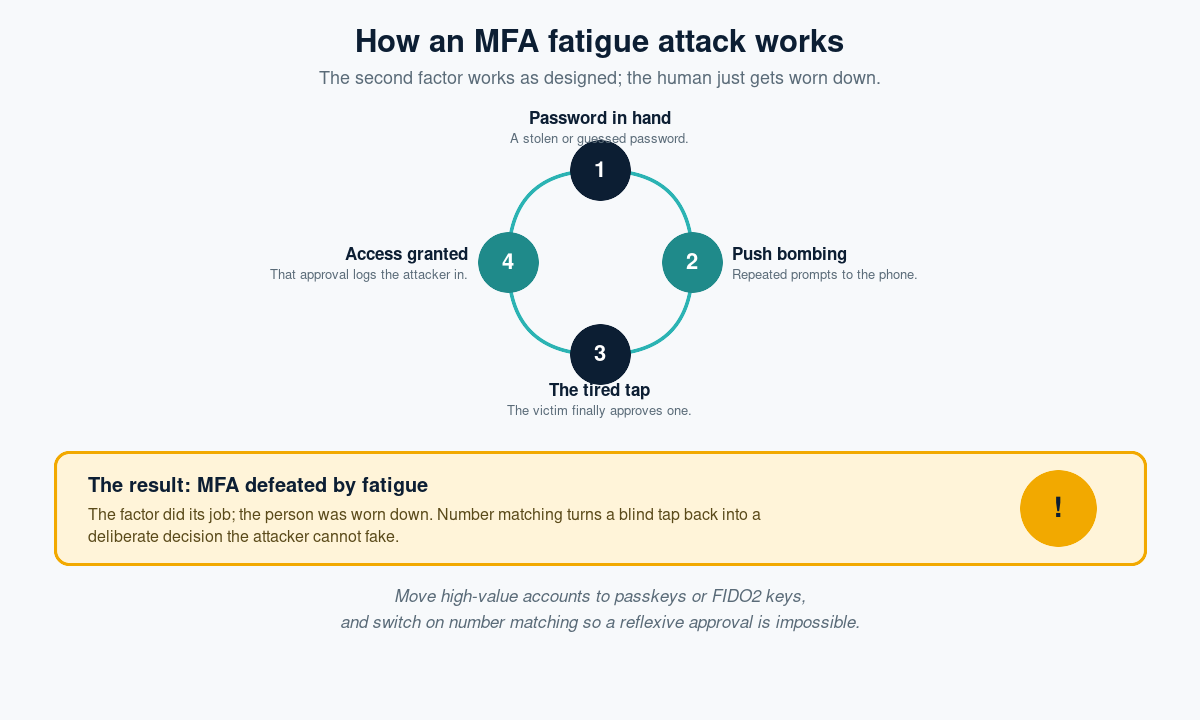
How an MFA fatigue attack works
- Password in hand. The attacker starts with a stolen or guessed password, often bought in bulk.
- Push bombing. They attempt to log in repeatedly, firing a stream of approval prompts at the victim’s phone.
- The tired tap. Annoyed, confused, or assuming a glitch, the victim finally approves one, sometimes after a follow-up “IT” call urging them to.
- Access granted. That approval satisfies MFA and the attacker is in.
The tell-tale signs
- Unexpected MFA prompts when you are not trying to log in, the clearest signal your password is already compromised.
- A burst of prompts in quick succession, or arriving at odd hours.
- A follow-up call or message claiming to be IT and asking you to approve “to clear an error”.
Every one of these should be treated as evidence of a stolen password: the account needs a reset, not an approval.
How to stop push-bombing
Turn on number matching
Number matching requires the user to type a number shown on the login screen into their authenticator, rather than simply tapping yes. It converts a reflexive approval into a deliberate action an attacker cannot complete from afar, and it neutralises the majority of fatigue attacks on its own.
Move to phishing-resistant MFA
Passkeys and FIDO2 security keys remove the approve-prompt entirely, binding authentication to the device and the genuine web address. There is no prompt to spam and nothing to approve by mistake. Prioritise privileged accounts first.
Limit and alert on prompts
Cap the number of MFA requests allowed in a short window, and alert your security team when that threshold is hit. A flurry of denied prompts is an early warning of a compromised password.
Tell people to report, not approve
Make sure staff know that an unexpected prompt means “deny and report”. Regular realistic simulations keep that instinct sharp, and an easy way to report a suspicious prompt turns a near-miss into an early alert.
The bottom line
MFA fatigue is a social-engineering attack wearing a technical disguise: the factor never fails, the person does. The fixes are well understood and inexpensive: switch on number matching, move high-value accounts to passkeys, cap and alert on prompts, and teach staff that an unexpected approval request is a red flag, not a routine annoyance. Do that, and the tired tap that once handed over an account simply cannot happen.
Phishing Tackle offers the tools businesses need to strengthen their human risk strategies, with multi-platform testing, real-time behavioural insights, and actionable data to keep your organisation ahead of modern cyber threats.
Contact us today to learn how Phishing Tackle can help safeguard your organisation from the growing array of cyber risks.
