

The Passkey You Never Set Up
The call comes from someone who sounds like your own IT team. They know the company name, they know you have been getting those little prompts from Microsoft lately, and they are friendly about it. Time to set up a passkey, they say, the new sign in that means no more passwords. Stay on the line and they will walk you through it. Ten minutes later you have clicked through a few tidy Microsoft branded screens, saved a recovery phrase, and been told you are all set. You feel slightly more secure than you did before breakfast.
You are not. What you actually did was help a stranger register their own passkey against your account.
Fake passkey enrolment is a phone based scam that turns a genuine security upgrade into a break in. An attacker calls, poses as IT, and walks you through a convincing but fake passkey setup while quietly registering a passkey they control on your real Microsoft account. The login everyone calls unphishable was never broken. The person setting it up was.
Okta's threat intelligence team documented this campaign in early July 2026, tracking the group behind it as O-UNC-066 (Palo Alto's Unit 42 calls the same cluster CL-CRI-1147, or Pink). It has been running since at least April 2026 against organisations in food and beverage, technology, healthcare, automotive, construction and aviation. The motive is data extortion, and the group runs a leak site to pressure victims who do not pay.
Why now, and why passkeys?
Timing is the whole trick. Since May 2026 Microsoft has let administrators run passkey registration campaigns that nudge people to enrol during sign in, and in some tenants those nudges are on by default. So a message telling you to set up a passkey is not suspicious at all. It is exactly what your employer has been asking you to do. The attacker is not fighting that expectation, they are surfing it.
It helps that most of us have never actually registered a passkey and have only a hazy sense of how it should feel. That unfamiliarity is the gap the scam lives in. When you do not know what the real thing looks like, a good imitation is impossible to catch.
How does the call actually work?
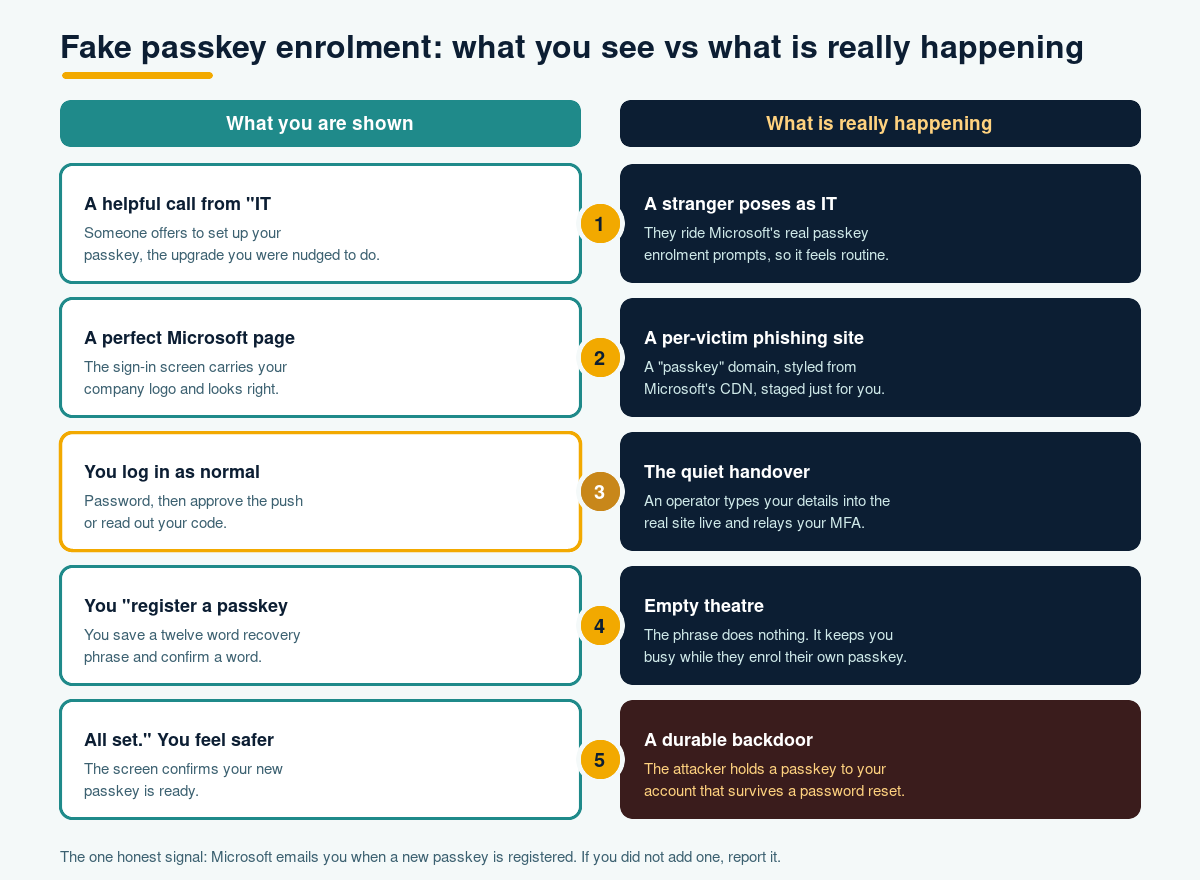
This is where it stops looking like ordinary phishing. There is no mass email blast and no clumsy link to a lookalike site sitting in your inbox. The attacker registers domains with the word passkey baked into them, such as setpasskey or deploypasskey, and builds a per victim subdomain dressed in your company's real logo and colours. The generic Microsoft styling loads straight from Microsoft's own content network, so the page looks right down to the pixel.
Behind it sits something more hands on than a typical phishing kit. Rather than a passive page that scrapes whatever you type, this is an operator controlled panel that a human steers in close to real time, polling for your next move about once a second. As you move through the screens, the operator watches and decides what you see next. If your account uses an authenticator app, they show you the app screen. If it uses a text message code, they show you that one instead. The caller adapts the script to your setup as it happens.
The quiet handover in the middle
Here is the part that matters. The fake pages ask for your username, then your password. The moment you submit them, the operator takes those credentials to the genuine Microsoft sign in page for your company and logs in as you. Microsoft then asks them for your second factor, so the panel simply shows you a matching screen and asks you to approve the push, or read out the code, or type the one time password. You do it, because you think you are finishing your own login. In that instant you have handed over the live session, and the attacker is inside your real account.
So where does the passkey come in?
Once they are in, the passkey theatre begins. You are shown a page that says register your passkey, then a page inviting you to save a twelve word recovery phrase, then a page asking you to confirm the last word of it. It feels thorough and official. It is also completely hollow. A real passkey is created by a dialog on your own device, tied to that device, not by typing words into a website. Those twelve words are borrowed from the look of a cryptocurrency wallet to feel legitimate, and they do nothing. They are there to keep your hands busy.
While you are occupied, the attacker registers their own passkey on your account, straight with Microsoft, from their machine. When they are done you get a screen that says all set, and you believe you set something up. You did not. They did.
The turn: the strongest login, pointed the wrong way
Passkeys are genuinely excellent. They cannot be reused, they cannot be typed into the wrong site, and they resist the phishing that has plagued passwords for thirty years. None of that was defeated here. The cryptography did its job perfectly. It just did that job for the attacker, because the attacker is now a legitimately enrolled owner of a passkey on your account.
That is what makes this worse than a stolen password. A password you can change in a minute. A passkey the attacker controls is durable, it survives a password reset, and it is itself resistant to being phished back out of their hands. The property that makes passkeys so good for you makes them just as good for whoever holds one. The weak point was never the login. It was the ten minute conversation that decided who got to enrol it.
What can you actually do about it?
The reassuring part is that stopping this does not need anything exotic. It needs the enrolment process to be as trusted as the login it protects.
For individuals, the rule is short. Real IT does not phone you out of the blue and stay on the line while you set up a passkey. If a call like that arrives, hang up and ring your service desk on a number you already trust. A real passkey setup happens through a prompt on your own phone or laptop, not a website that wants a password and a recovery phrase. And if a genuine looking email from Microsoft tells you a new passkey was added to your account and you did not add one, treat that as an alarm, not admin. That notification is often the one honest signal in the whole attack.
For organisations, the levers are familiar ones. Restrict who can register a new authenticator, and where from, so a passkey can only be enrolled from a managed device or a trusted network rather than any browser on the internet. Keep and publicise a simple way for staff to verify that a caller really is IT, because a confident voice with your logo on the screen is doing a lot of the attacker's work. Watch your own logs for new passkey and security key registrations and make an unexpected one worth a phone call. Underneath all of that, treat this as a people problem to be solved with practice, not blame. Regular phishing simulations and a proper security awareness programme build the instinct to pause on an unexpected call, and knowing where you stand helps too, which is where a quick read of your human risk earns its place.
Passkeys are still one of the best moves you can make against phishing, and this campaign is not a reason to slow down. It is a reminder that a lock is only as trustworthy as the moment you decide who gets a key.
Key takeaways
- A live vishing campaign (tracked by Okta as O-UNC-066) phones staff, poses as IT, and tricks them into approving an attacker controlled passkey on their real Microsoft 365 account.
- It rides on Microsoft's own passkey enrolment nudges, so the pretext feels routine rather than suspicious.
- The passkey screens you see are fake and do nothing. The real damage happens when you hand over your password and second factor mid call.
- A passkey the attacker enrols is durable and survives a password reset, which makes it more dangerous than a stolen password.
- Genuine passkey setup happens through a device prompt, never a website asking for a password and a recovery phrase. A Microsoft alert about a passkey you did not add is a red flag worth reporting.
Frequently asked questions
Does this mean passkeys are unsafe?
No. The passkey technology was not broken in this attack, and passkeys remain one of the strongest defences against phishing. The attackers abused the enrolment process, not the login itself, by talking a person into approving a registration they controlled.
How would I spot the scam on the call?
Two things stand out. Real IT will not cold call you and stay on the line while you set up a passkey, and a genuine passkey is created by a prompt on your own device, not by entering a password and a twelve word phrase into a web page. If either of those feels off, hang up and call your service desk on a trusted number.
We have multi factor authentication. Are we protected?
Not on its own. The operator relays your second factor in real time during the call, so a text code or an approved push can still land in their hands. Restricting who can enrol authenticators, and requiring a managed device to do it, matters more here than the second factor alone.
What is the single most useful signal to watch for?
The automatic email Microsoft sends when a new passkey is registered. In this attack the passkey is enrolled by the criminal, so that message may be the only honest notification you receive. Tell staff that an unexpected one means report it now, not later.
Phishing Tackle offers the tools businesses need to strengthen their human risk strategies, with multi-platform testing, real-time behavioural insights, and actionable data to keep your organisation ahead of modern cyber threats.
Contact us today to learn how Phishing Tackle can help safeguard your organisation from the growing array of cyber risks.
